
RATINGS
280M
DOWNLOADS
4+
AGE

 Download Latest APK

Wait a moment, your result is coming soon!

Face is not found. Please try again with another clear full-face portrait of a better quality.

Take Quiz Now
Screenshots

About this app
-
 Name DPS Mobile
-
 category Business
-
 Price Free
-
 Safety 100% Safe
-
 Developer DPS Software Ltd
-
 Version 5.2
-
 Target Business Professionals
-
 Update 2026.11.21
Related articles




Core Features
-
Real-time Job ManagementDPS Mobile allows users to manage jobs and tasks in real-time, ensuring that all updates and changes are reflected instantly. This is essential for maximizing efficiency, especially for field workers who need immediate access to job details.
-
Seamless CommunicationThe app provides integrated communication tools that facilitate easy interaction between team members. Notifications and messaging features help in keeping everyone informed and coordinated, minimizing miscommunication.
-
User-friendly InterfaceDesigned with a clean and intuitive interface, DPS Mobile enhances user experience. Navigating through menus and accessing features is straightforward, making it suitable for users of all technical skill levels.
-
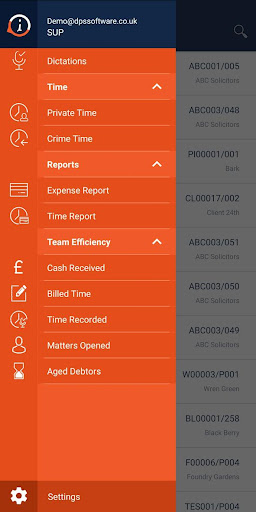
Customizable ReportsUsers can generate and customize reports on job performance, team productivity, and workload. This feature is particularly useful for managers who want to track progress and make data-driven decisions.
-
Offline AccessDPS Mobile offers offline functionality, allowing users to access necessary information and update job statuses without needing an active internet connection. This is ideal for workers in remote areas.
Pros
-
Increased EfficiencyBy allowing real-time updates and job management, the app significantly improves operational efficiency, saving both time and resources.
-
Enhanced Team CollaborationThe communication tools foster better teamwork, ensuring that everyone stays in the loop and that tasks are well coordinated.
-
AccessibilityWhether you are in the office or out in the field, users can easily access the app, enhancing flexibility and productivity.
-
Robust Reporting ToolsThe ability to create customized reports provides valuable insights into performance metrics, aiding in strategic planning.
-
Intuitive DesignIts user-friendly interface makes it easy for users to adopt and integrate the app into their daily routines, without extensive training.
Cons
-
Limited Offline FeaturesWhile the app offers offline access, some features, such as certain reporting capabilities, may not be available without a connection, limiting full functionality in non-network areas.
-
Learning Curve for New UsersNew users may initially find some advanced features overwhelming, which could require additional time to master.
-
Dependent on Device SpecificationsPerformance may vary on devices with lower specifications, leading to slower load times or occasional glitches.
-
Subscription CostsSome users may find the ongoing subscription fees for advanced features to be a financial consideration, particularly for small teams.
-
Potential Overload of FeaturesUsers may feel overwhelmed by the number of features available, which could complicate the user experience if they only require basic functionalities.
Price
-
Free VersionDPS Mobile offers a free version that provides limited but useful functions for managing jobs and tasks.
-
Pro SubscriptionThe Pro version includes advanced features such as detailed report generation and enhanced communication tools for a competitive monthly fee.
-
Discounts for TeamsTeams can benefit from discounted rates when multiple subscriptions are purchased, making it cost-effective for businesses.
-
Trial PeriodNew users can usually take advantage of a free trial period for the Pro version to explore additional features before committing.
-
Transparent PricingPricing structures are clear and straightforward, allowing users to understand the costs upfront without hidden fees.