RATINGS
1599M
DOWNLOADS
4+
AGE

 Download Latest APK

Wait a moment, your result is coming soon!

Face is not found. Please try again with another clear full-face portrait of a better quality.

Take Quiz Now
Screenshots



About this app
-
 Name Photo Video Maker - InSlide
-
 category Video Players & Editors
-
 Price 0
-
 Safety 100% Safe
-
 Developer Daily AI Studio
-
 Version 8.0
-
 Target Casual Creators
-
 Update 2025.06.05
Related articles


Core Features
-
Music IntegrationEasily add a wide range of music styles to your slideshows, including Pop and Bollywood tunes. You can upload your own tracks or select recommended songs for specific occasions, enhancing the overall emotional impact of your video.
-
Transition EffectsUtilize one-click transition effects for a seamless video experience. With a huge variety of transitions to choose from, you can optimize the visual flow of your slideshow without manually selecting each one.
-
Resolution and Aspect Ratio CustomizationChoose from five resolution options ranging from 480P to 2K, ensuring your videos meet your quality requirements. Adjust the aspect ratio for easy uploading to platforms like YouTube, Instagram, and TikTok.
-
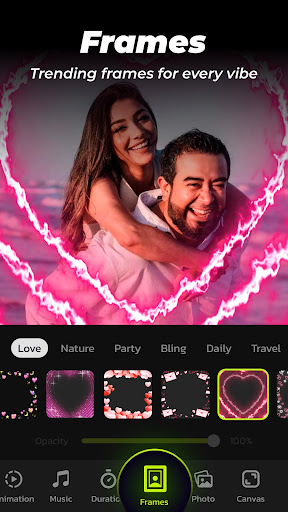
Content LibraryAccess a well-organized and continuously updated content library with various frames and themes. Personalize your slideshows with categorized options that match your event, such as family or travel.
-
User-friendly InterfaceCreate stunning videos in just four simple steps. Import multiple photos at once and quickly assemble them into professional-looking videos with an intuitive interface.
Pros
-
Ease of UseThis app is designed for users of all skill levels, making it incredibly simple to create professional-looking slideshows without any prior experience.
-
Variety of Customization OptionsWith multiple frames, transitions, and music choices, the app allows for significant personalization, ensuring each video is unique and tailored to your preferences.
-
Fast Video AssemblyThe quick assembly feature lets users import multiple photos and create slideshows in minutes, perfect for last-minute presentations or sharing moments.
-
Social Media ReadyVideos can be easily shared on major platforms, making it convenient to connect with friends and audiences on social media.
-
Comprehensive Video LibraryThe built-in video library allows users to efficiently manage and access all created videos in one place, simplifying sharing and organization.
Cons
-
Watermark on Free VersionThe free version includes a watermark on exported videos, which may be a drawback for users wanting a polished final product.
-
Performance on Low-End DevicesHigh-resolution video processing may lead to slower performance or crashes on low-end devices, potentially affecting user experience.
-
Limited Advanced Editing FeaturesWhile the app focuses on simplicity, advanced users may find limited capabilities for intricate video editing compared to professional software.
-
In-App AdsThe presence of ads in the free version may interrupt the creative process, which could be frustrating for users seeking a smooth experience.
-
Varied Music LibraryWhile there is a wide range of music options, some users may find the library lacking in specific genres or recent hits.
Price
-
Free VersionThe free version includes all basic functionalities but may have limitations such as a watermark and in-app ads.
-
Premium SubscriptionUnlock advanced features, remove watermarks, and gain access to an ad-free experience with a subscription, offering greater flexibility and quality.
-
One-Time Purchase OptionSome features may also be available as one-time purchases, appealing to users who prefer not to subscribe but still want to enhance their experience.
Ratings
4.9
95.1K votes
-
5
-
4
-
3
-
2
-
1